Clicking straight to the newest post on Forums
Site QUESTIONS ? How do I...?
Also, note the last poster's name, when they posted it, and shows their avatar...
updated by @strumelia: 06/29/15 11:17:50PM
Also, note the last poster's name, when they posted it, and shows their avatar...
Ok, I'd like to start taking a look at this issue, but i need to have an exact step-by-step description of how you get to this point where you arrive at the oldest posts of a forum discussion (which is what you don't want).
Please be very specific about where you start from, and what you click on in the series of clicking that you are doing.
Start from the beginning- where are you starting from? Outline each click step for me please.
Dalton, the short answer is- we'll often re-tune our melody string so that the melody notes we need are playable on the melody string and not 'missing'.
Here is a blog post I wrote about why I might be in a different tuning in order to get those 'missing' notes on my melody string...it's about DAA, but can be applied to help answer your question: http://dulcimer-noter-drone.blogspot.com/2009/02/why-i-like-daa-tuning.html
I'm sure others will chime in with some great replies as well. :)
Dan,
I'm sorry we were not able to fix your tablet problem and I'm sorry the site does not meet your needs.
Please let me know if you want to leave the site and if so, I can assist you in deleting your account.
John, I've always read that squashing a desktop browser screen does not accurately replicate what happens on true mobile devices. I imagine tests are usually better on a real mobile device?
Wish I could lose weight by just squashing my screen...
No problem George! Be sure to look over all the tabs and settings in your "Account Settings"- you get lots of choices on how you want your account to work here!
Update: Hey George- beatuful new avatar you added there!
Hi George,
Dusty said:
George, once you are logged in, hold your cursor over your name in the toolbar (but don't click), and you will see a drop-down menu. Click on "Account Settings." Once there, you will see the generic picture with an option underneath it to "upload new image." Choose that and then you can upload a picture from your computer. When you are done, don't forget to "Save Changes" on the bottom of the screen.
Let us know if you still can't do it.
lol Dusty. I hear what you are saying. I think these are points that might be addressed further down the road. They'd require some in depth testing and there are other issues which take precedence for a good while yet. Not saying these things are not important, just that a bunch of other other stuff requires my time ahead of them, and it'll likley be while...a couple months maybe, before I can approach them. I'm still in the 'gros-tuning' stage rather than the 'fine-tuning' stage.
One thing i will say though- this site was built on a Jamroom platform, but was put together so that it could import and support our various familiar ning-platform content and functions. To do that, some areas were coded differently from other areas, which intentionally makes them behave a little differently from each other. The Forums area for instance is not quite the same as the Groups features, or the video area that combines uploade, vimeo, and youtube videos all together. The site's areas all do function a bit differently from each other, and their coding is different, so different areas of the site might not display exactly the same on some devices...just a thought that may or may not be relevant to what you brought up. :)
Those are the TABS you would normally see in the Forums area, if you are responding to an email notification concerning an updated discussion you are following, for example. It would take you here for instance, where you'd need to see and navigate between those discussion area TABS: http://fotmd.com/forums/forum/new_posts
Those tabs links do not appear on the site's main page.
Similarly... If you go to your profile page , likewaise you'll see a selection of navigation TABS that you would normally see on your profile page: Latest Activity, Audio, Video, Events, etc.
Dusty, do you mean the top brown site links bar? Doesn't the desktop links bar normally get replaced by the universal mobile menu icon anyway, when the screen is small, like on a small phone?
I can produce a similar effect to Dan's screenshot when I zoom in my desktop view too much, even though my desktop is not a mobile device.
Yeah, the name should absolutely be changed, imho. The name is so terribly important, and the current one gives an icky effect.
The old site was not mobile-responsive, so it could be zoomed-in/out all as one picture of each page. Of course that would mean endless scrolling on a smartphone, so not good. Dan, can you maybe post a screenshot here of your menu area taking up half the screen? What hapopens in vertical orientation for you?
Ken, thanks for your take. I don't have much control over the virtual keyboards on people's devices, Im afraid. But glad to know otherwise you are not having a problem.
You can join our Public Domain...or Not? Group here and ask every time you have a question about a certain song:
http://fotmd.com/strumelia/group/40/public-domain-or-not
But often it's just faster to google "(song title) copyright" and go to the resulting Wiki page...where it usually tells the composers or traditional info. It will also give versions and talk about any copyrighted lyrics someone may have added later, etc. Most songs first published before 1926 are now in the public domain, by the way.
When you click on the top site LINK to Forums , you get to the main Forums page, but you'll have THREE TABS available to choose from, and each tab will show you a different view of what you might want to see: Discussions (which is the default view and shows all the forum Categories), Newest Posts (which shows newsest posts and by whom and when, in which forum disussions), and My Posts (which of course shows your own latest forum posts). For example, here is the view when i go to the main Forums link and then click on the Newest Posts TAB.
And if you like that "Newest Posts" view in particular, you can always bookmark it to get there quickly whenever you like.
Annie, if you are on an ipad mini, you should be able to go to the itunes APP STORE and look for tablet apps while using search terms like "Font size" or "magnifier" or "resize screen font"...etc.
The old FOTMD was pretty lame on mobile devices according to most users who reported multiple ongoing problems to me.
One more suggestion, not tryng to be a wise acre, but...maybe some stronger drugstore reading glasses for mini-tablet reading? Might be less trouble than any other solution...
Anne, there are various ways to increase font sizes through browsers settings and browser plugins. I think if I increase the site's overall font size, it's going to really mess everyone on phones. So either way there would be a problem. If the mobile zoom function is not right for you either, can you browse in your browser options to try and find a font resizer plugin ? For example, on firefox i like to use: ThemeFont&SizeChanger plugin.
No worries Nigel, glad to helped. I've had that feeling for several months now...
What kind of tablet are you using Dan? I am not seeing this problem on my iPad mini. Zooming in was no problem for me either.
--Feedback from others?- Anyone else experiencing these issues, and please tell us the type of tablet you are seeing this issue on?
Nige,
click to "Forums" (top navbar links), then go to a forum category...for example "Off Topic Forums".
there, you should see a big Plus+ button the add a new discussion in that forum category. See screenshot...
And the best thing is- FOTMD is now in a much more secure and safe environment for the future! No more renting from a cold uncaring marketing corporation Glam/Ning anymore. Now we truly OWN our site here, and it's modern and mobile-friendly and more powerful and flexible for the future!
p.s. plus I can add a gazillion smilies, whatever I like! lolol
Thank you so much for your kind comments, CD. Good to see you've made it here to the New Frontier!
Big thanks to our three generous Moderators - Dusty Turtle, Jim Fawcett, and Robin Thompson .... who helped all the way through these changes, and helped me test the site while under construction. They also provided wise advice and strong shoulders to lean on when things were difficult.
And of course none of this 'building/moving to a new site' would have been bothered with at all if the entire FOTMD membership weren't so wonderful to begin with! AND... special thanks to all the members of FOTMD who have donated generously- without whose contributions there would not have been the funding to do all this during the past year or so. (and Patron members- I have not forgotten to work on getting your badges back, never fear!)
Group hug to us all!
Thanks Ken, good job!
Jean, your profile page is: http://fotmd.com/jean-ann-moon
Going there, I see you tried to add your event but you added it to your account settings- not the place to do that.
Your personal photo avatar should be showing on your profile page, not your event picture. And your 'bio box' is for describing a little about yourself when vistitors come to your profile page.
Change that picture in your account settings to something more personal for your own membership photo. Change your biop box to say something about youruself, not about your event.
Then in your same Profile Page there, do as Ken suggested- look for the TAB that says 'Events', and that's where you will add your event info and event picture, etc.
To get to your profile page easily in the future click right ON your name in the top bar links....rather than clicking in any of the other drop down menu options. Your name will take you to your profile page. In fact if you click on your name link anywhere here, in this thread too, it will take you to your profile page as well. To actually change your settings, you would choose the "account settings" from the drop down menu at top, UNDER your name.
If it's a small event with a single instructor or a club event, see the top links navbar and go to the Single Instructor Forum to post it.
If it's a larger gathering, festival, camp, with multiple performers and instructors, then you can list it in the regular site calendar.
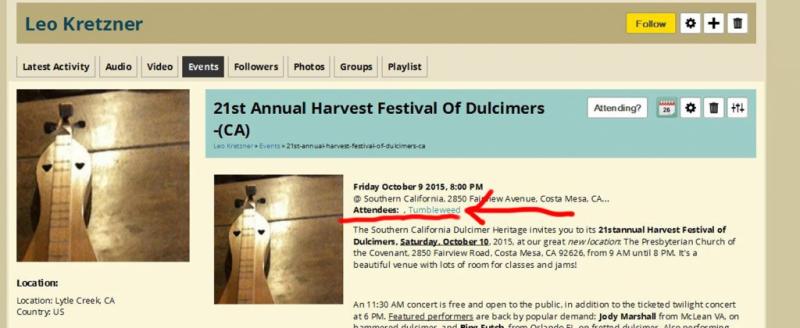
You must add an event from your profile page- go there, and click on your Events TAB and look for the plus sign. Hope this helps.
(Site calendar events will be pending until approved by admin)
Mike, please use our site settings questions forum for your questions about the new site.
For example, it answers your group question already: http://fotmd.com/forums/forum/new-site-questions-how-do-i/14543/why-do-my-groups-not-show
Lexie, so glad to see you've 'made it across'! lol
Images that were attachments to posts in the old site were not migrated to here- it was not possible because of the Ning archiving tool formatting.
They would have to be added again new. Sorry!
What Stephanie said!
NOTE that if you choose to not receive 'any' site notifications, then you WON'T be notified if someone:
Sends you a private message... 'likes' one of your items.... 'follows' you... posts in one of your discussion threads.... comments on your profile page... asks you a question about your item or your post... mentions your name in one of their posts... makes a new post in a discussion or group you are 'following'... signs your guestbook... comments on one of your photos, videos, soundclips, etc etc...
In other words, you won't know if anything is posted or sent concerning you or your site activities and items.
Go to your profile page and look for the Gear icon for SETTINGS.
If you cannot find your porfile page:
See along the very top of the site, the bar with all the main links? See you name as the right most link? Hover your mouse over your name and you will see the drop-down menu in which is "account settings". There you will be able to type in a NEW password of your choice and SAVE tting. Keep your password is a safe place! Hope this helps.
Thanks for that, Paul! I bet your new dulicmer is awesome- looking forward to a simple tune recording from you!
Do you want to receive site email notifications when someone comments on one of your items, or sends you a private message? Do you want to adjust or choose the types of notifications you receive from FOTMD? This is done in your Account Settings, in the Notifications TAB.
.
Looks like a great price for this!
It looks more like about 15-20 years old to me. -based on the very modern/current tuning machines, the zero and 6.5 frets and the heavy fret material, the wide chording fingerboard, the commercial inlay strip along back, the rounded 'shop' edged peghead shaping, the mixing of wood types, the soundhole shaping, and other little style touches. This is not a forty year old dulcimer.
Fairly well made, and in great shape as far as one can see.
What is the VSL/scale length, from zero fret to bridge?
No marks or labels inside at all? Is a label perhaps unglued and rattling around inside?
Lucky buy!